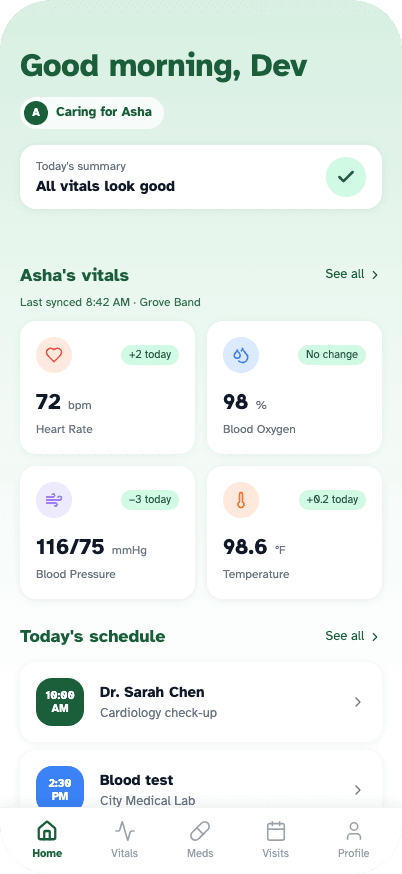
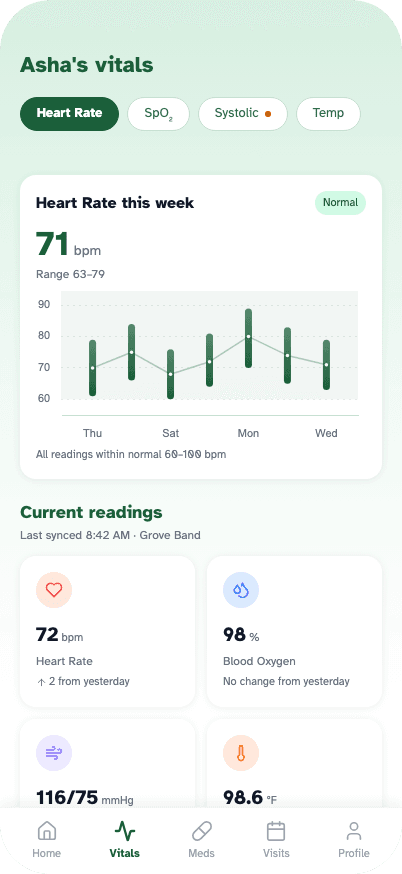
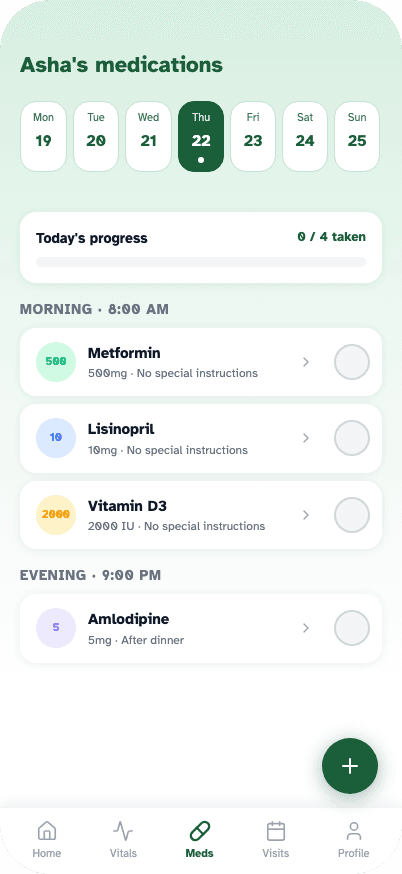
Screens from the Grove app: home, vitals, and medications.
Grove
One app for everyone caring for the same person.
A health-monitoring app concept for families navigating the complexity of elder care.
2025 · 12 weeks / UX / UI Designer · Figma · iOS · Android
- Accessibility
- Systems Thinking
- Health Design
- Mobile
- User Research
The Problem
Caring for an elderly person is a coordination problem as much as a medical one.
1 in 4
adults over 65 fall each year; fewer than half ever tell their doctor
~70%
of caregivers report that coordinating care across multiple providers is overwhelming
1 in 7
adults in the US live alone, over 90 million people, many of them elderly
76%
fewer readmissions when remote vital monitoring is in place post-discharge
A primary caretaker manages the day-to-day. Adult children check in from a distance. These people rarely talk to each other in real time, and the tools they use, if they use any, don't talk to each other either. A caretaker keeps a paper medication list. A family member calls to check in and gets a vague 'she's fine.' When something goes wrong, it's usually discovered late.
Existing products don't solve this. Medical alert devices like Life Alert handle emergencies but offer no ongoing health data. Consumer wearables like Apple Watch are built for individuals managing their own health, not for a care network managing someone else's. Medication apps like Medisafe address one slice of the problem. Nothing connects the whole picture.
Grove fills that gap: one app where the caretaker and the family each see the same patient in the format their role needs, in real time. It isn't a medical device or a wellness tracker. It's the coordination layer between the people already doing the caring.
“I only find out something's wrong when Mum calls, or worse, when the hospital does.”
Research & Discovery
Users & Roles
One patient. Two perspectives.
The design implication of two roles is not just about permissions. It's about information density. A family member seeing the same dashboard as a caretaker would be overwhelmed by clinical detail they cannot act on. Each role required its own hierarchy of what's shown first, what's surfaced prominently, and what's hidden entirely.
The caretaker is the power user, responsible and hands-on. The family member needs calm, not complexity: reassurance from a distance rather than a control panel.
One deliberate choice: role selection happens before the patient profile is created. You pick your role, then you build the patient. This means the caretaker, the person most likely to complete the setup, naturally encounters the full onboarding first. Family members are invited in after the profile exists.
Caretaker
Full access
Sets up the patient profile, manages medications and appointments. Primary responder to alerts. The person who onboards everyone else.
Family Member
Read-only
Sees vitals, GPS location, and alerts. Cannot modify clinical data. Gets peace-of-mind visibility without being overwhelmed by medical detail.
How I Approached It
Research & Discovery
Semi-structured interviews with primary caretakers and adult children managing parents remotely. Competitive audit across six existing products.
Role-Based Information Architecture
Mapped what each role needed to see, do, and feel. Caretaker needs full control. Family needs calm reassurance. Same underlying data, two distinct information hierarchies.
Accessibility-First Visual Design
Atkinson Hyperlegible selected as the sole typeface. Every sizing and contrast decision flows from this. Touch targets sized explicitly for elderly motor control, not just WCAG minimums.
Prototype & Test
High-fidelity Figma prototype tested across 6 usability sessions. The medication tracking flow was iterated three times. It had the highest error rate early and zero critical errors by final testing.
What I Decided, and Why
The most consequential architectural decision in the project.
Showing the same data to a family member and a caretaker would overwhelm one and under-serve the other. Role selection at onboarding gates access permanently. This meant designing two distinct information hierarchies for the same underlying data, a significant amount of work that most competing products have avoided by defaulting to one-size-fits-all.
Information Architecture
iOS · Caretaker view
App entry point
Caretaker only
01
Home
02
Vitals
03
Medications
04
Appointments
05
Profile
Design System
A system built around the user, not convention
Atkinson Hyperlegible, an accessibility-first typeface
Designed by the Braille Institute specifically for people with low vision. Its defining characteristic is that every letterform is exaggerated to be distinguishable: the lowercase l and uppercase I look nothing alike. Choosing this typeface is not an aesthetic decision. It is a functional one. Two weights are used throughout: 400 for body text and 700 for headings. No other weights. No other fonts.
Scroll to see full type scale →
64px / Bold
Hero vital reading
72 bpm
36px / Bold
Page titles
Dashboard
22px / Bold
Section headers
Today's Medications
18px / Regular
Input fields
Lisinopril 10mg, take with food
14px / Regular
Secondary metadata
Last updated 2 minutes ago
11px / Bold
Nav labels / badges
NORMAL · TAKEN · VITALS
Colour palette
Deep forest green
Primary: headers, CTAs
#1B5F3A
Light green
Accent, logo fill
#93E0B1
Muted green
Subtext on dark
#A8D4B9
Success tint
Normal / Taken states
#D1FAE5
Success text
Text on success tint
#065F46
Surface
Profile screen background
#F5FAF7
Vital semantic colours
Heart Rate
Blood Oxygen
Blood Pressure
Temperature
The Design
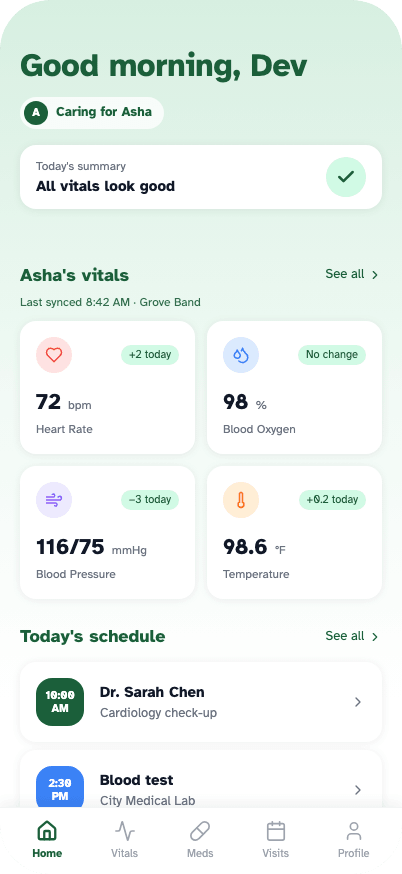
Home
Everything a caretaker needs to assess the day in under ten seconds.
- A summary line commits to a verdict, “All vitals look good”, above any number. The interpretation is done before the reading is reached
- Every vital carries its change since yesterday as a token: +2 today, no change, −3 today. No arithmetic needed to notice movement
- A “Caring for Asha” chip sits under the greeting, so the app never implies the data belongs to the person holding the phone
Outcomes & Reflection
Outcomes
6 usability sessions. All participants completed core tasks without assistance
Medication flow iterated 3 times. Zero critical errors in final testing
Reference range panel was the most consistently praised feature across all sessions
Accessibility audit passed WCAG AA across all text and background combinations
Reflection
“Grove taught me that the hardest design problems are not interface problems. They are information problems. The decisions that shaped this product most were upstream of any specific screen: who are the users, what do they actually need, and what does success feel like for each of them.”
“The biggest single lesson: accessibility is architecture, not decoration. Choosing Atkinson Hyperlegible was the first decision, and it constrained every other decision downstream. If you start from the most limited user and design outward, you produce something better for everyone.”
Accessibility · Systems Thinking · Health Design · Mobile · User Research